User roles specify a set of rights which later can be assigned to user groups and users. Generally PeakTMS distinguishes
between 2 role types:
Functional role (FUNCTIONAL):
A set of general rights which define which functions of PeakTMS can use. They are independent of any operational data.
Mainly they are used to grants right to certain Administrator functionality.
Data pool role (DATA_POOL):
A set of rights which is based on the main operational business entities, resource, value list, activity and project.
Data pool roles specify what users can do within the operational data of PeakTMS.
In the user roles administration you can list all users and edit them or create new PeakTMS user roles.
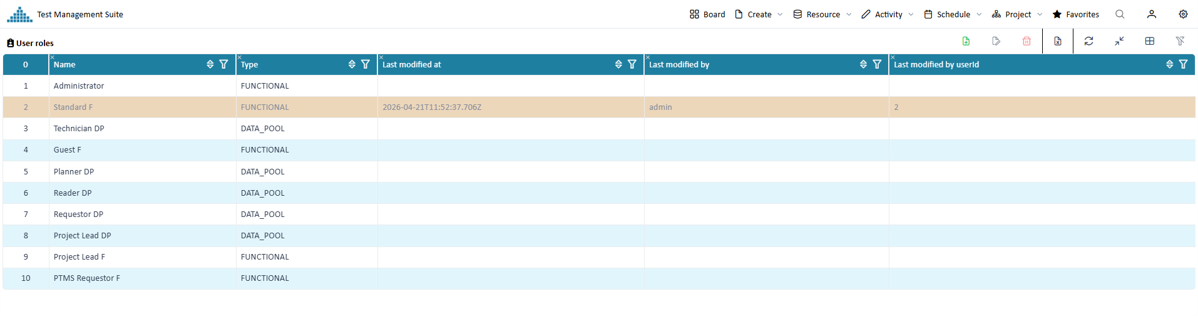
The user roles list view
The list view provides you with an overview over all currently registered user roles. You can use the table headers to define filters or to
change the column width and order. Pressing the column chooser icon
will give the possibility to add additional columns, e.g. about the change history.
Overview registered users
The user role Administrator is specified by PeakTMS and cannot be altered nor deleted!
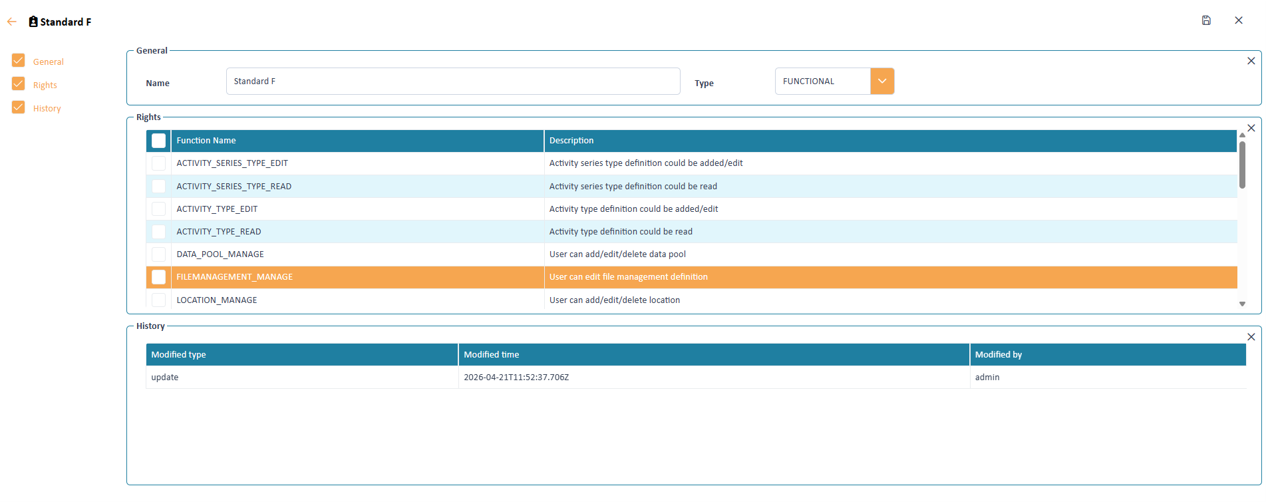
Create / Edit a user role
Press the create or edit button. In the upcoming edit mask fill the relevant properties
Input mask to define the user role properties
User role properties
A user contains the following information
Name
Name of the defined user roles
Type
Either FUNCTIONAL or DATA_POOL.
Rights
Set of rights granted to the user role. Depending on the Type either data pool rights or functional rights can be selected.
Data pool rights (DATA_POOL)
Following rights are available to a data pool right role
ACTIVITY_ALLOCATE_RESOURCE
Right assign resources to ab activity
ACTIVITY_DELETE
Right to delete activities
ACTIVITY_EDIT
Right to edit the information of activity.
ACTIVITY_LIST_INPUT
Right to do batch update of activity list.
ACTIVITY_PERIOD_CHANGE
User can change start and end of an activity, e.g. when editing activity or move via drag & drop.
ACTIVITY_READ
Right to read the information of activity. If not set, user cannot read activity information and cannot start activity wizards.
No information will be displayed in the resource calendar text and tooltip.
ACTIVITY_REQUEST
Right to create an activity.
ACTIVITY_SERIES_ALLOCATE_RESOURCE
Right to allocate resources to activity series.
ACTIVITY_SERIES_CALENDAR
Right to open an activity series calendar (only rich client).
ACTIVITY_SERIES_DELETE
Right to delete activity series.
ACTIVITY_SERIES_EDIT
Right to edit activity series.
ACTIVITY_SERIES_PERIOD_CHANGE
User can change start and end of an activity series, e.g. when editing activity or move via drag & drop.
ACTIVITY_SERIES_READ
Right to read the information of activity. If not set, user cannot read activity series information and cannot start activity series wizards.
No information will be displayed in the resource calendar text and tooltip.
ACTIVITY_SERIES_REQUEST
Right to create create activity series.
FILE_DELETE
Right to delete files from file management attribute fields.
FILE_DOWNLOAD
Righ to download files from file management attribute fields.
FILE_EDIT
Right to edite file descriptions of file management attribute fields.
FILE_UPLOAD
Righ to upload files to file management attribute fields.
PROJECT_CALENDAR
Right to open project calendar in PeakTMS.
PROJECT_DELETE
Right to delete projects.
PROJECT_EDIT
Right to add/edit project information.
PROJECT_READ
Right to read project information in the project management
REPETITIVE_ACTIVITY_EDIT
Right to create repetitive activities.
RESOURCE_CALENDAR
Right to open resource calendar in PeakTMS for the addressed resources.
RESOURCE_DELETE
Right to delete resource.
RESOURCE_EDIT
Right to add/edit resource.
RESOURCE_LIST_IMPORT
Right to import resources via CSV file.
RESOURCE_LIST_INPUT
Right to batch input into resource management list
RESOURCE_READ
Rightto read resource, read tooltip in the resource calendar
SUB_ACTIVITIES_REQUEST
Right to create sub activities (task).
VALUELIST_EDIT
Right to edit or create a value list.
VALUELIST_READ
Right to read a value list.
VALUELIST_DELETE
Right to delete a value list.
Functional rights (FUNCTIONAL)
ACTIVITY_SERIES_TYPE_EDIT
Right to add, edit and delete activity series types.
ACTIVITY_SERIES_TYPE_READ
Right to read activity series types.
ACTIVITY_TYPE_EDIT
Right to add, edit and delete activity types.
ACTIVITY_TYPE_READ
Right to read activity types in administration.
DATA_POOL_MANAGE
Right to add/edit/delete data pools.
FILEMANAGEMENT_MANAGE
Right to edit file management definition.
LOCATION_MANAGE
Right to add/edit/delete locations.
MESSAGEDEF_MANAGE
Right to add/edit/delete message definitions.
MONITOR_READ
TMS special: Right to start resource monitor.
ODSMAP_MANAGE
Right to manage mappings to ODS systems
PLAN_VERSION_EDIT
Right to label a new version in TMS.
PLAN_VERSION_READ
Right to used labels for comparison of previously planned data and current data.
PRP_START
TMS special: User can start TMS rich client from TMS web client (soon depreciated).
REPORTTEMP_MANAGE
Right to add/edit/delete report template.
RESOURCE_TYPE_EDIT
Right to add/edit/delete resource types.
RESOURCE_TYPE_READ
Right to read resource types in administration.
STATUS_ENGINE_MANAGE
Right to read, add, edit and delete status engines.
USER_DELETE
Right to delete user, user groups and roles
USER_EDIT
Right to add/edit user, user groups and roles
USER_READ
Right to read user, user groups and roles in the administration.