Write your first rule
To get a quick understanding of the integration of rules into TMS we start with a quick example: We will write a rule which validates the calibration date of test benches. Therefore, we go into the rules administration and create a new rules snippet. The code is based on our DEMO showcase data.
The code snippet
Copy the following code into the code editor:
package com.peaksolution.tms.drools.testbench.calibration

import com.peaksolution.rules.model.Resource;
import com.peaksolution.rules.model.Validator;
import com.peaksolution.rules.model.SessionContext;
import com.peaksolution.rules.model.Attribute;


global Validator validator;
global SessionContext sessionContext;

rule "Testbench Calibration"
    when
        $r: Resource($attrs : attributes)
        $attr: Attribute(name == "NEXT_CAL_DATE", getValueAsDate().before(new
          java.util.Date())) from $attrs
    then
        validator.error("This test bench needs calibration!", $attr);
end
If we look in the written script, we can see following elements:
Package declaration
The package declaration defines the name space of the rules. Inside a package each rule must have a unique name. In particular when working with own written functions the name space becomes very important.
Import of Java classes
Drools allows access to the import of Java classes. Therefore, TMS has specified a set of domain classes which the TMS rules developer can use to analyze PeakTMS facts and interact with the TMS application. The set of provided facts and the possible interactions depend on the business context.
Global accessible variables
To interact with the TMS application depending on the business context some global Classes are available to the developer to interact with the TMS application. In this example we see the Object “validator” which helps us to show warning or error messages to the user and “sessionContext” which might provide additional spe-cific information, e.g. about the connected user.
The declared rules
Last but most important a set of rules, each with a unique name is written, in this example we just have the rule “Testbench Calibration”. Each rule consists of 2 main parts
When part – filtering the available data
Different than an imperative, the when-clause is more seen as a “data filter”. In this example the line
$r: Resource($attrs : attributes)
assigns all Resources in the Drools session to the variable $r and all attributes of the resources into the variable $attrs. The next line selects all attributes with manualId NEXT_CAL_DATE and which value is older than the cur-rent date.
Attribute(name == "NEXT_CAL_DATE", getValueAsDate().before(new java.util.Date())) from $attrs
Then part – action if filter criterias are matched
validator.error("This test bench needs calibration!", $attr);
The than part specifies what to do in case the filter criteria in the when part is successful. In this case, using the validator object TMS is informed, that it shall display an error message.
Assign the code snippet to the resource Testbench
To assign the rules to test benches we need to add an entry in the rules assignment table. Afterward, the rule is registered for being executed in actions on test benches.
Rules execution
Now the rule is integrated into the system. To execute the rule, we open a test bench in our test calendar through double-clicking onto the resource header in the test bench calendar:
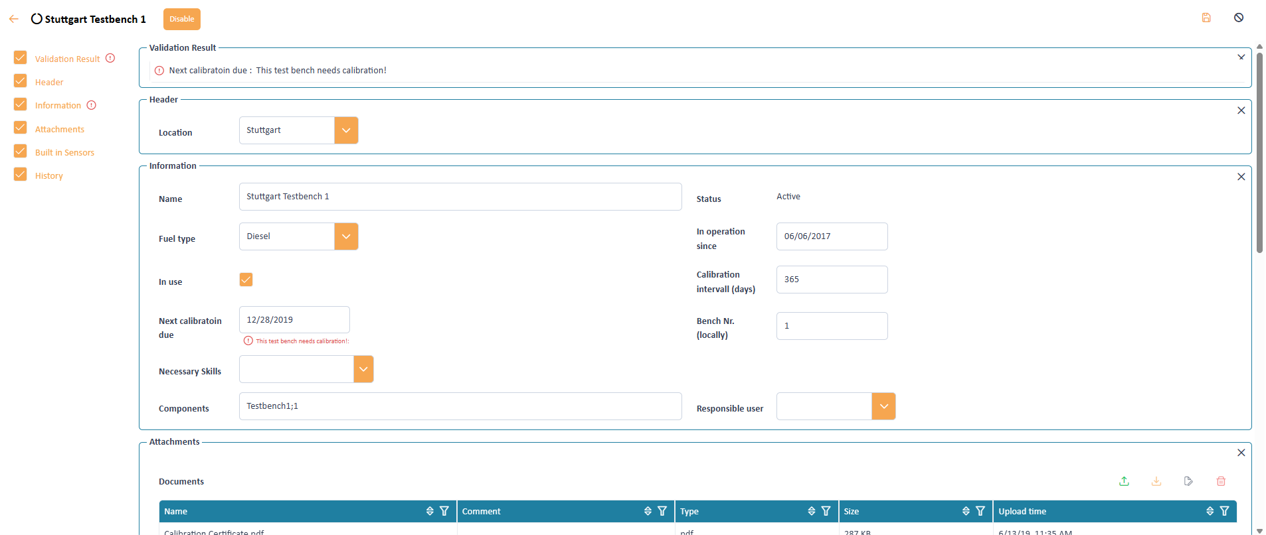
Resulting error message due to calibration rule
In the dialog we press the save button. As the due date in this dialog is clearly passed our rule fires and we see the according error message.