Examples
Along with some examples in following a few ideas for how to write rules in the Drools language and therefore enhance your TMS business logic grouped by the different business entities of TMS. All examples are made compatible with the data in our DEMO showcase.
Examples on resource related rules
We group all resource related files within the same rule set files which will have the following header
package com.peaksolution.tms.drools.resource.test

import com.peaksolution.rules.model.Resource;
import com.peaksolution.rules.model.Validator;
import com.peaksolution.rules.model.SessionContext;
import com.peaksolution.rules.model.Attribute;

global Validator validator;
global SessionContext sessionContext;
Raising an error based on a condition
The following example conducts a check on a date and raises an error message if it is expired.
rule "Testbench Calibration"
    when
        $r: Resource($attrs : attributes)
        $attr: Attribute(name == "NEXT_CAL_DATE", getValueAsDate().before(new java.util.Date())) from $attrs
    then
        validator.error("This test bench needs calibration!", $attr);
end
Raising a warning based on a condition
The next example will recommend the user a calibration interval of less than a year, if the supported engine type is “Electric”.
rule "Testbench Calibration intervall for Electric"
    when
        $r: Resource($attrs : attributes)
        $attrElectr: Attribute(name == "FUEL_TYPE", "Elec-tric".equals(getValueAsString())) from $attrs
        $attr: Attribute(name == "CAL_INTERVAL", getValueAsLong() < 365) from $attrs
    then
        validator.warning("Better calibrate the testbench twice a year", $attr);
end
Restricting a number field (maximum temperature)
In following the input value of the volume for a climate chambers is restricted to a certain number range.
rule "Restrict Climate chamber volume"
    when
        $r: Resource($attrs : attributes)
        $attr: Attribute(name == "VOLUME") from $attrs
    then
        $attr.getRestriction().setMinAsDecimal(java.math.BigDecimal.valueOf(1.0));
        $attr.getRestriction().setMaxAsDecimal(java.math.BigDecimal.valueOf(2.0));
end
Restricting a value list field (Supplier list)
In following the supplier list of a climate chamber is reduced to just 2 possible entries.
rule "Restrict Supplier list"
    when
        $r: Resource($attrs : attributes)
        $attr: Attribute(name == "SUPPLIER") from $attrs
    then
        $attr.getRestriction().setAllowedValues("Peak Climate Systems Creation N.V.", "Peak Engine Testbench Ltd.");
end
Examples on activities related rules
We group all files within the same rule set files which will have the following header
package com.peaksolution.tms.drools.activity.test

import com.peaksolution.rules.model.Activity;
import com.peaksolution.rules.model.Resource;
import com.peaksolution.rules.model.Validator;
import com.peaksolution.rules.model.SessionContext;
import com.peaksolution.rules.model.Attribute;

global Validator validator;
global SessionContext sessionContext;
Setting duration of an activity in dependence of input fields
The example below specifies for different test cycles the duration of a test and disables the duration field.
rule "Set Duration for FTP 72"
    when
        $activity: Activity()
        $attrCycle: Attribute(getName() == "TEST_CYCLE", getValueAsString()  == "FTP 72")
    then
        $activity.setEnd($activity.getBegin().plusHours(7));
end

rule "Set Duration for ECE 15"
    when
        $activity: Activity()
        $attrCycle: Attribute(getName() == "TEST_CYCLE", getValueAsString()  == "ECE 15")
    then
        $activity.setEnd($activity.getBegin().plusHours(6));
end
The mask will accordingly apply the rule and change the fields „duration” and “end” accordingly in any input mask but also, when a test is saved in the backend, e.g. via REST API.
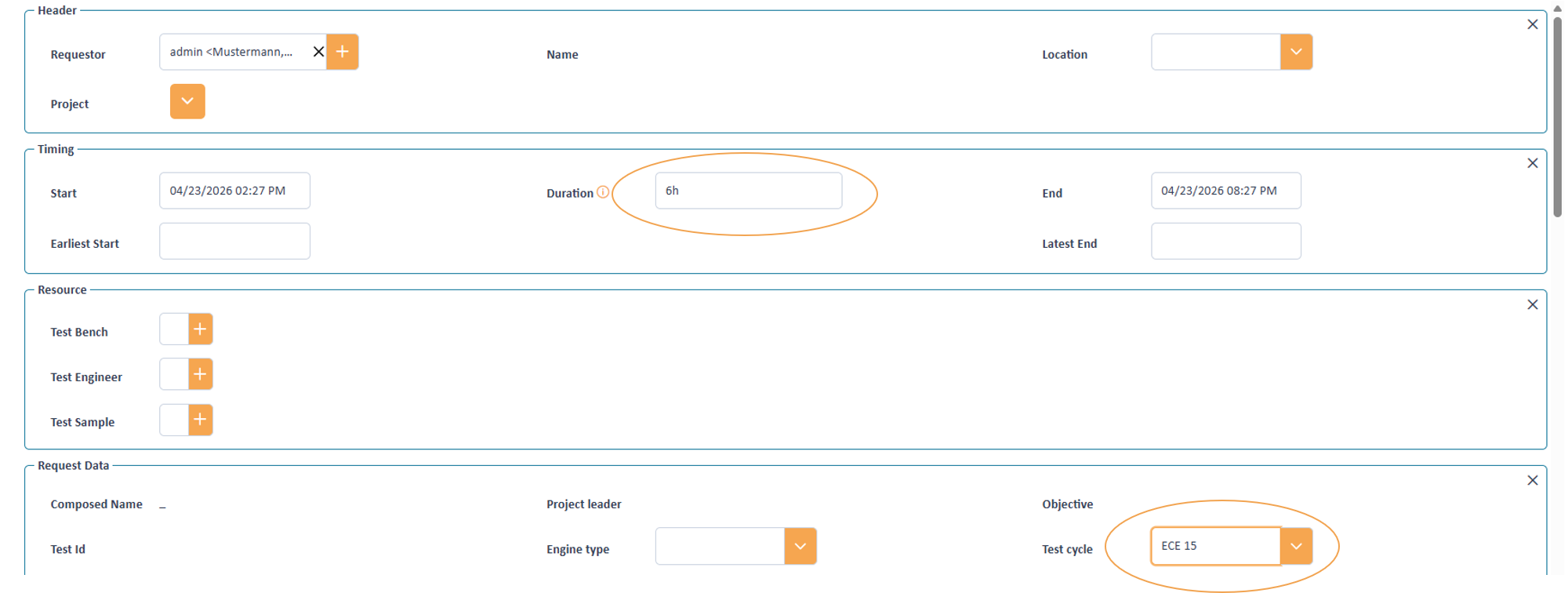
Setting duration based on a test cycle
Declare hidden attributes (cookies)
The following code declares a field as hidden attribute. Here e.g. some technical relevant data could be transported which is not supposed to be seen by the user. Please note, that this only makes the information invisible in the masks. If the administration adds this attribute as column to the table configuration than still it is visible in table and eventually tooltips.
rule "Make hidden comment not visible (e.g. for use as cookie)"
    when
        $attrHiddenComment: Attribute(getName() == "HIDDEN_COMMENT")
    then
        $attrHiddenComment.setVisible(false);
end
Copy a summary of an assigned resource into the activity
This example looks for an assigned sample, reads out some of the basic information and summarizes the information in a field of the activity (e.g. for later use in a tooltip).
rule "Taking over attributes from an assigned resource into a summary field"
    when
        Activity($assignedResources: resourceAssignments)
        $sample: Resource(getTypeName() == "CAR", $sampleAttributes: attributes)
           from $assignedResources
        $attrCarId: Attribute(getName() == "SAMPLE_NR") from $sampleAttributes
        $attrProducer: Attribute(getName() == "PRODUCER") from $sampleAttributes
        $attrBuilddate: Attribute(getName() == "BUILD_DATE") from $sampleAttributes
        $attrSampleSummary: Attribute(getName() == "TEST_DESCRIPTION")
    then
        $attrSampleSummary.setValueAsString("Sample: "
            + $attrCarId.getValueAsString()
            + " " + $attrProducer.getValueAsString()
            + " " + $attrBuilddate.getValueAsString());
end
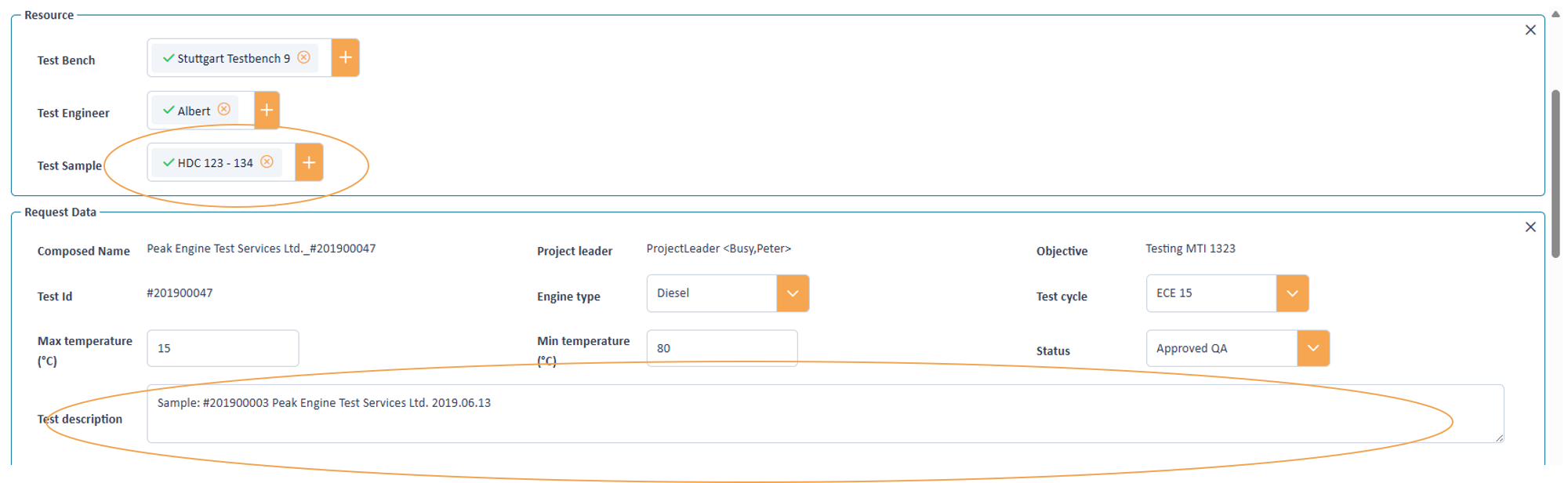
Writing resource information into a test fied
In case we might have more than 1 sample the code needs to be adapted:
Now we write 2 rules. One rule sets the text field empty by default. The next one creates the summary. Note that here the
Then statement is automatically executed for each record set the when condition is matched. With the parameter salience = 20 we make sure,
that we first cleanup the field before we execute the rule to add the summaries of the resources which has salience = 10.
Note also that the than part of the rule “Taking over attributes from an assigned resource into a summary field” is executed twice,
once for each matching record.
rule "empty sample summary field"
    salience = 20
    when
        $attrSampleSummary: Attribute(getName() == "TEST_DESCRIPTION")
    then
        $attrSampleSummary.setValueAsString("");
end

rule "Taking over attributes from an assigned resource into a summary field"
    salience = 10
    when
        Activity($assignedResources: resourceAssignments)
        $sample: Resource(getTypeName() == "CAR", $sampleAttributes: attributes) from
              $assignedResources
        $attrCarId: Attribute(getName() == "SAMPLE_NR") from $sampleAttributes
        $attrProducer: Attribute(getName() == "PRODUCER") from $sampleAttributes
        $attrBuilddate: Attribute(getName() == "BUILD_DATE") from $sampleAttributes
        $attrSampleSummary: Attribute(getName() == "TEST_DESCRIPTION")
    then
        $attrSampleSummary.setValueAsString($attrSampleSummary.getValueAsString()
            + ($attrSampleSummary.getValueAsString().isEmpty() ? "" : "\n")
            + "Sample: " + $attrCarId.getValueAsString()
            + " " + $attrProducer.getValueAsString()
            + " " + $attrBuilddate.getValueAsString());
end
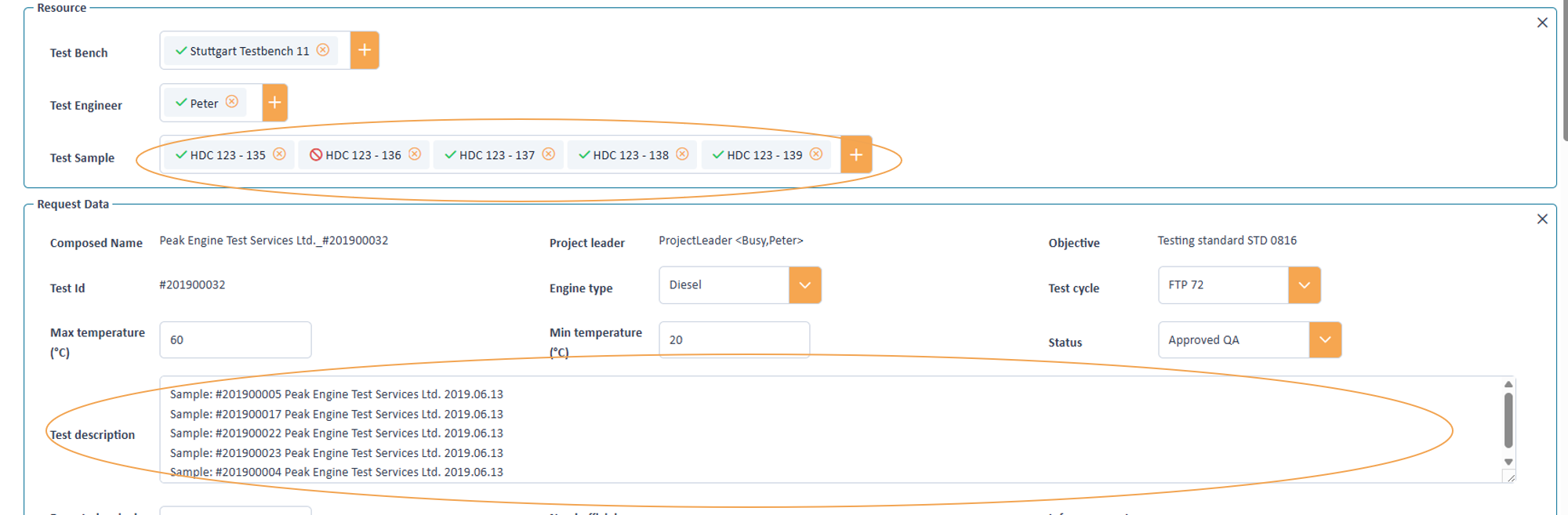
Writing resource information into a test fied
Examples on activity series
We group all resource related files within the same rule set files which will have the following header
package com.peaksolution.tms.drools.test

import com.peaksolution.rules.model.Activity;
import com.peaksolution.rules.model.ActivitySeries;
import com.peaksolution.rules.model.Resource;
import com.peaksolution.rules.model.Validator;
import com.peaksolution.rules.model.SessionContext;
import com.peaksolution.rules.model.Attribute;

global Validator validator;
global SessionContext sessionContext;
Setting minimum duration
The following rule specifies, that the duration of an activity series can not be shorter than 7 days, elsewise it will just override the duration.
rule "Override duration with at least 7 days"
    when
        $series: ActivitySeries(end.minusDays(7).isBefore(begin))

    then
        $series.setEnd($series.getBegin().plusDays(7));
end
Examples of interactions between different entities
We group all resource related files within the same rule set files which will have the following header
package com.peaksolution.tms.drools.test

import com.peaksolution.rules.model.Activity;
import com.peaksolution.rules.model.ActivitySeries;
import com.peaksolution.rules.model.Project;
import com.peaksolution.rules.model.Resource;
import com.peaksolution.rules.model.Validator;
import com.peaksolution.rules.model.SessionContext;
import com.peaksolution.rules.model.Attribute;

global Validator validator;
global SessionContext sessionContext;
Restricting a value list in an activity / series based on multiselect field in a project
The following code uses a multi selection field in a project to limit the possible entries within a dependent activity.
rule "restrict engine types "
    when
        $project: Project($pAttributes: attributes)
        $attrAllowedEngTypes: Attribute(name == "ALLOWED_ENGINE_TYPES") from $pAt-tributes
        $attrEngineType: Attribute(name == "ENGINE_TYPE")
    then
        $attrEngineType.getRestriction().setAllowedValues($attrAllowedEngTypes.
                       getSelectedStringValues());
end
Taking over begin and end of an activity series into an activity
If an activity is part of a series, then its beginning and end will be automatically set as earliest start date and latest end date.
rule "Earliest Start latest End take over"

 when
      $activity: Activity();
      $series: ActivitySeries(getId() != null)
    then
      $activity.setEarliestStart($series.getBegin());
      $activity.setLatestEnd($series.getEnd());
end
Generation of subactivities
The API allows the creation of Activities and adding them to a parent as Subactivities. The following example generates a subactivity for each non-working day within the duration of the activity. Thereby it uses the additional the methods to get the non-working days as well as assigning resources to the subactivities.
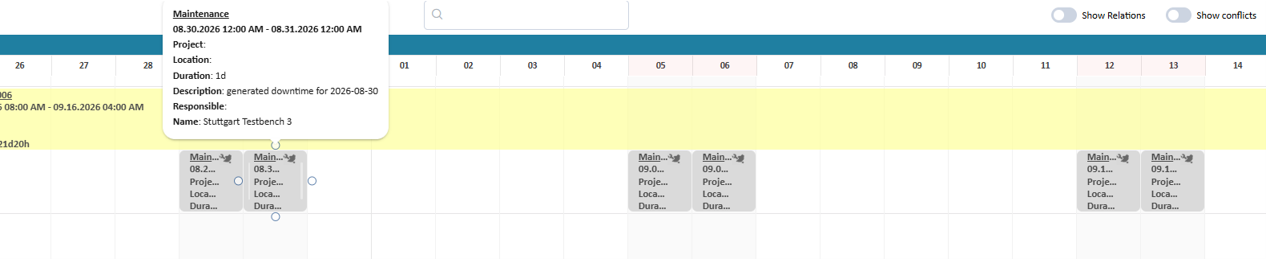
Regenerating sub activities which cover non working days
package com.peaksolution.tms.drools.testlib.subactivities;

import java.time.ZonedDateTime;
import java.time.LocalDate;
import java.time.LocalTime;
import java.time.ZoneId;
import java.util.ArrayList;
import java.util.Collections;
import java.util.List;
import java.util.Set;
import com.peaksolution.rules.model.TMS;
import com.peaksolution.rules.model.Activity;
import com.peaksolution.rules.model.Attribute;
import com.peaksolution.rules.model.DataAccessException;
import com.peaksolution.rules.model.Resource;
import com.peaksolution.rules.model.Validator;
import com.peaksolution.rules.model.SessionContext;

global Validator validator;
global SessionContext sessionContext;

rule "delete sub activities"
salience 0
when
   $main: Activity(typeName == "DEV_TESTING", subActivity == false, $resources: getResourceAssignments(), TMS.SAVE.equals(sessionContext.getAction()))
then
  Set<Activity> $subactivities =  $main.getSubActivities();

  for (Object a : $subactivities)
  {
    $main.removeSubActivity((Activity) a);
  }
end

rule "generate off times on non workin days"
salience -1
when
  $main: Activity(typeName == "DEV_TESTING", subActivity == false, $resources: getResourceAssignments(), TMS.SAVE.equals(sessionContext.getAction()))
then

Set<Activity> $subactivities =  $main.getSubActivities();

  // get assigned benches (if any)
  ArrayList<Resource> benchList = new ArrayList<>($resources.size());
  for (Object r : $resources)
  {
    Resource res = (Resource) r;
    if ( "TESTBENCH".equals(res.getTypeName()) )
    {
      benchList.add(res);
    }
  }

  ZonedDateTime start = $main.getStart();
  ZonedDateTime end = $main.getEnd();
  //In case of 00:00 the upcoming day should not be considered
  LocalDate localEndDate = end.toLocalTime().equals(java.time.LocalTime.MIDNIGHT)
    ? end.minusDays(1).toLocalDate()
    : end.toLocalDate();
  //Retrieve the non working days within the range of the parent activity
  Set<LocalDate> nonWorkingDays = sessionContext.getNonWorkingdays($main.getStart().toLocalDate(), localEndDate);
  ZoneId zoneId = ZoneId.systemDefault();

  for(LocalDate nonWorkingDay: nonWorkingDays)
  {

     ZonedDateTime subStart = ZonedDateTime.of(nonWorkingDay, LocalTime.of(0, 0, 0), zoneId);
     ZonedDateTime subEnd = ZonedDateTime.of(nonWorkingDay.plusDays(1), LocalTime.of(0, 0, 0), zoneId);
     if (subEnd.isAfter(end))
     {
        subEnd = end;
     }
    // Create a new activtiy of type Maintenance
    Activity weekendTask = sessionContext.newActivity("MAINTENANCE");
    $main.addSubActivity(weekendTask);
    // register as sub activity
    weekendTask.setStart(subStart);
    weekendTask.setEnd(subEnd);
    // Set short description
    for (Attribute attrib : weekendTask.getAttributes())
    {
      if ( "DESCRIPTION".equals(attrib.getName()) )
      {
        attrib.setValueAsString("generated downtime for " + nonWorkingDay);
      }
    }

    // assign the same test bench(es) as the parent
    for(Resource bench : benchList)
    {
      weekendTask.addResource(bench, null);
    }
  }
end // rule