Rest API
To work with PeakTMS operational data in external systems like
- Reporting systems
- Resource management systems (e.g. internal sample management)
- Ticket tracking systems
- Request systems
- Accounting systems
PeakTMS offers access via the Rest API. It provides write and read access to all elements of type:
- Resource
- Project
- Activity
- Activity series
Specification
The specification is available via openAPI json documentation.
Example calls and data
Example calls against our DEMO showcase you can find in our published Postman collection here:
link to published Postman document
Login / Logout
The authentication is generally speaking guaranteed via bearer token. There are 3 different options to get a token
Option 1 - Generate a token in the application
PeakTMS provides the user the functionality to generate a bearer token with expiration date.
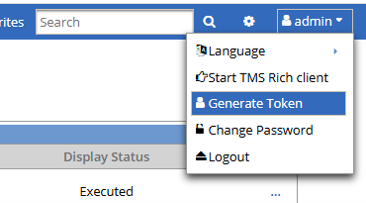
Overview registered data pools
Option 2 - Use /login endpoint
The /login endpoint provides you with the functionality to authenticate with user / password, therefore you'll get a 15min session bearer token in the response. This is the best way for users trying out the API.
Option 3 - External bearer token
In case an external identity provider is used than the authentication will accept an external token and forward it to the identity provider for verification.
Endpoint /activities
The endpoint provides methods to
- /query activities
- GET activities
- POST new activities
- PATCH activities
- PUT activities
- DELETE activities
- get the change history via activities/historylog
Specification:
Examples:
Endpoint /activityseries
The endpoint provides methods to
- /query activityseries
- GET activityseries
- POST new activityseries
- PATCH activityseries
- PUT activityseries
- DELETE activityseries
- get the change history via activityseries/historylog
Specification:
Examples:
Endpoint /projects
The endpoint provides methods to
- /query projects
- GET projects
- POST new projects
- PATCH projects
- PUT projects
- DELETE projects
- get the change history via projects/historylog
Specification:
Examples:
Endpoint /resources
The endpoint provides methods to
- /query resources
- GET resources
- POST new resources
- PATCH resources
- PUT resources
- DELETE resources
- get the change history via resources/historylog
Specification:
Examples:
Endpoint /resourceavailability
The endpoint provides for a given resource and time period, whether it is available or not.
Specification:
Examples:
Endpoint /files
All attributes in PeakTMS of type FILE_MANAGEMENT refer to a files id, which can contain one or many files. The endpoint provides methods to
- GET the different file descriptions
- POST (upload) a file directly into an attribute of type FILE_MANAGEMENT
Specification:
Examples: The endpoint provides for
Endpoint /filecontent
While each attribute of type FILE_MANAGEMENT leads to a container identified by filesid, each entry in this container is identified by the file_id. The endpoint provides methods to
- GET specific file description
- GET (download) the specific file content
- DELETE a specific file from the server, afterward the file entry in the corresponding attribute is removed.
Endpoint /valuelists
This endpoint provides "convenience methods" to create update and load value lists.
Specification:
Examples:
The endpoint only provides simple value lists. Those are value lists which only have 1 attribute.
Endpoint /users
This endpoint provides the possibility to get base data about user. For user data protection and security only very basic information are available
- Login name
- phone nrm
- name
- family name
- department
Specification:
Examples
Endpoint /maintenance windows
PeakTMS allows for definition of maintenance windows in which the application is not available. This endpoint allows 3rd party system to access the upcoming maintenance windows.
Specification:
Examples: